Confirming your email helps us keep your account secure and ensures you never miss important updates or promotions 📣 Here’s how to do it:
- Check your inbox for the confirmation email we sent when you signed up
- Click the Confirm my email button in the email. Once you do, your email will be confirmed, and you're all set

If it’s not in your main inbox, check your Spam or Promotions folders too.
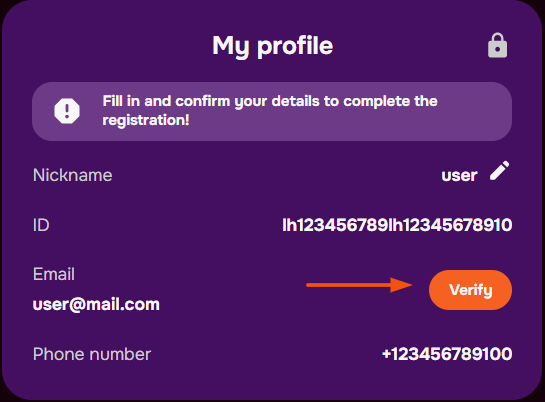
You can also confirm it from within your account 🗃️
- Go to the Profile tab
- Click Verify next to your email address
- We’ll send a new confirmation email – follow the same steps to finish up
Can’t find the email or having trouble confirming? 💬 No problem — just reach out to us via live chat, and we’ll help you complete it manually in no time.
Was this article helpful?
That’s Great!
Thank you for your feedback
Sorry! We couldn't be helpful
Thank you for your feedback
Feedback sent
We appreciate your effort and will try to fix the article